
Download AILogoArt – AI‑Powered Logo Transformation Tool for Brands
Introduction
In today’s fast‑paced digital marketplace, brands need visual assets that stand out without draining budgets or time. AILogoArt answers that call by turning a simple, static logo into a suite of high‑impact, AI‑generated artworks that can be deployed across advertising, social media, packaging, and every other touchpoint where a brand’s visual language matters. The platform is built as a cloud‑native web application, which means there’s no heavy software to download, install, or maintain.
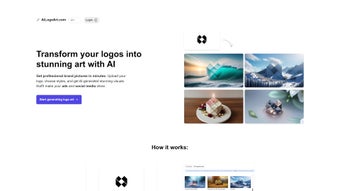
Instead, you access it through any modern browser on Windows, macOS, Linux, Android, or iOS devices. Once you upload a clean PNG or JPG version of your logo—ideally on a solid white or black background—the AI engine analyzes the shapes, colors, and negative space, then reimagines the design in a variety of artistic styles ranging from minimalist line art to bold, abstract compositions. Each generated image is delivered in high‑resolution (up to 4K) JPG or PNG files, ready for immediate use.
Importantly, every output includes a full commercial license, giving you unrestricted rights to use the artwork in paid campaigns, merchandise, or any other commercial context. AILogoArt’s pricing model is credit‑based, allowing you to pay only for the images you actually need while offering volume discounts for larger projects. This makes the tool especially attractive to small businesses, startups, and marketing teams that want professional‑grade visuals without hiring a full‑time designer for each iteration.
The service also emphasizes security: uploads are encrypted in transit, stored only for the duration of processing, and automatically deleted afterward. Whether you’re refreshing a brand identity, launching a limited‑edition product line, or simply experimenting with fresh visual concepts, AILogoArt provides a seamless, cost‑effective, and secure solution that scales with your creative ambitions.
Key Features and Benefits
AILogoArt distinguishes itself through a blend of sophisticated AI technology and user‑focused design. The platform’s core strength lies in its AI‑driven style engine, which offers both preset artistic templates and a free‑form prompt system. Users can select from curated styles—such as “Neon Cyberpunk,” “Vintage Watercolor,” “Geometric Minimalism,” or “Surreal Dreamscape”—or type a custom description to guide the AI toward a very specific aesthetic.
This flexibility ensures that the generated artwork aligns with brand guidelines while still offering room for creative exploration. Speed is another major advantage; most images are rendered in under two minutes, dramatically shortening the typical design cycle that can take days or weeks when relying on human designers. The credit‑based pricing structure further amplifies value, as you purchase only the images you need and benefit from bulk discounts when you scale up production.
Full commercial ownership removes any lingering licensing concerns, letting you confidently place the artwork in paid media, product packaging, or merchandise without fearing hidden royalties. Cross‑platform accessibility means the tool works identically on desktop browsers, tablets, and smartphones, enabling designers and marketers to create on the go. Security features, including TLS 1.3 encryption and automatic deletion of source files after processing, protect sensitive brand assets.
Additional utilities such as version history, batch upload of multiple logo variations, and an enterprise‑grade API for automated workflows make AILogoArt a comprehensive solution for both solo entrepreneurs and larger agencies seeking to integrate AI‑generated visuals into their existing pipelines.
- AI‑Driven Style Engine: Choose from preset artistic styles or write a custom prompt for truly unique results.
- Instant Generation: Images are rendered in under two minutes on average, accelerating campaign timelines.
- Full Commercial License: Every output is yours to use commercially, without hidden royalties.
- Multiple Export Formats: Supports high‑resolution JPG and PNG, ideal for print and digital media.
- Credit‑Based Pricing: Pay only for the number of images you need, with volume discounts for larger bundles.
- Cross‑Platform Access: Works on Windows, macOS, Linux, Android, and iOS browsers.
- Brand Consistency Tools: Upload multiple logo versions to maintain visual harmony across campaigns.
- Secure Cloud Storage: All uploads are encrypted and automatically deleted after processing.
- Version History: Keep track of past generations and revert to previous designs with a single click.
Installation, Usage, and Compatibility
Getting started with AILogoArt is intentionally frictionless because the service lives entirely in the cloud. There is no traditional software download or installation; you simply open a modern browser—Chrome, Firefox, Edge, or Safari—on any device that meets basic performance criteria. Navigate to ailogoart.com, click “Sign Up,” and create a free account by providing an email address and a password.
After confirming your email via a short verification link, you are ready to begin. The user interface is organized into a clean dashboard where the primary actions—Upload, Style Selection, and Generate—are prominently displayed. To upload, click the “Upload Logo” button and select a PNG or JPG file (maximum size 5 MB).
For optimal AI interpretation, a logo on a solid white or black background works best, as it provides clear contrast for shape detection. Once uploaded, you can either pick a style from the visual gallery or type a free‑form prompt such as “retro neon sign” or “hand‑drawn charcoal sketch.” After confirming your choice, press “Generate.” The AI processes the request on secure cloud servers, and within 60‑120 seconds you receive a grid of thumbnail previews. Each thumbnail can be expanded for a larger view; if a particular rendition isn’t quite right, you can click “Regenerate” to let the AI produce variations based on the same prompt.
When satisfied, hit “Download” to save the high‑resolution file directly to your device. All downloads are watermark‑free, and the files retain the full commercial rights granted by the platform.
Compatibility is a hallmark of AILogoArt’s design. Because the heavy computation occurs server‑side, local hardware specifications have little impact on performance. The only system requirements are a stable internet connection of at least 3 Mbps and a screen resolution of 1024 × 768 pixels or higher.
The service is fully responsive, meaning it automatically adapts to different screen sizes, whether you are on a 27‑inch desktop monitor, a 13‑inch laptop, or a 6‑inch smartphone. It supports Windows 10/11, macOS Ventura and later, major Linux distributions with a recent Chromium engine, Android 12+ browsers, and iOS 14+ Safari. For organizations with stricter security policies, AILogoArt offers an enterprise‑grade API that can be called from internal tools, allowing the AI generation to be embedded within private networks while still benefiting from the same encryption and automatic data deletion guarantees.
Updates to the AI model, UI enhancements, and new style packs are rolled out automatically—there is no need to manually patch or reinstall anything. In short, AILogoArt provides a seamless, universally accessible experience that lets anyone, regardless of device or operating system, generate professional‑grade logo artwork in minutes.
Pros and Cons
Pros
- Rapid AI generation saves hours of manual design work.
- Flexible credit‑based pricing lets you pay only for what you need.
- Full commercial rights eliminate licensing headaches.
- Cross‑platform web access requires no installations or updates.
- Secure upload with TLS 1.3 encryption and automatic file deletion.
- Version history and batch upload support brand consistency.
- Enterprise API enables integration with existing design pipelines.
Cons
- Best results rely on a simple, high‑contrast logo input.
- Advanced style customization may require trial‑and‑error to perfect prompts.
- No offline mode—an active internet connection is mandatory.
- Batch‑processing features are limited for very large agencies.
- High‑resolution output credits can add up for extensive campaigns.
Frequently Asked Questions
Can I use the generated images for commercial advertising?
Yes. Every image produced by AILogoArt comes with a full commercial license, allowing unlimited use in ads, merchandise, and online campaigns without additional fees.
What file formats are supported for upload and download?
Uploads accept PNG or JPG files up to 5 MB. Generated outputs are delivered as high‑resolution PNG or JPG, depending on the selected export option.
Is there a free trial or demo version?
A free account provides three complimentary image generations, letting you test the AI quality before purchasing additional credits.
How secure is my original logo during processing?
All uploads are encrypted in transit (TLS 1.3) and stored only for the duration of processing. After generation, the original file is automatically deleted from the server.
Can I integrate AILogoArt into my own design workflow?
Yes. For enterprises, AILogoArt offers an API that can be called from design tools, content management systems, or custom scripts, enabling seamless automation.
Conclusion & Call to Action
AILogoArt bridges the gap between fast‑track branding and high‑quality visual design. By leveraging cutting‑edge AI, it empowers businesses of any size to refresh their logo aesthetics without the cost and time associated with traditional graphic designers. The platform’s ease of use, cross‑platform compatibility, and commercial‑ready licensing make it a compelling addition to any marketer’s toolbox.
If you’re ready to experiment with AI‑generated artwork and give your brand a fresh visual edge, simply sign up for a free account and claim your three complimentary images today. Once you’ve experienced the speed and quality, consider upgrading to a credit bundle to unlock unlimited creative possibilities. Transform your branding instantly—download, generate, and deploy with confidence.
Pros: rapid generation, commercial rights, intuitive UI, secure processing.
Cons: relies on simple logo inputs, no offline mode, limited batch features.



.png)



